
| overview | products | download | order | support | info | FORUM | about |

|
|
||||||||||
|

|
|
|
About Comparator for CD Bank CataloguerComparator is a tool for comparing the disk from CD Bank Cataloguer with selected drive or path on your computer. Install it to CD Bank folder and you find it in "Tools\CD Cover\Comparator.exe" item of CD Bank main menu. Read Comparator help file for more information. How it work?Comparing mean find files on hard drive, which already exists in CD Bank base. You need to download (see Télécharger page) from our site and install the Comparator, configured to work with CD Bank Cataloguer. After CD Bank restart, new command appear in the "Tools > CD Covers" menu. From now, you can compare any disk from CD Bank catalog with any drive or folder, without additional actions. Comparator interface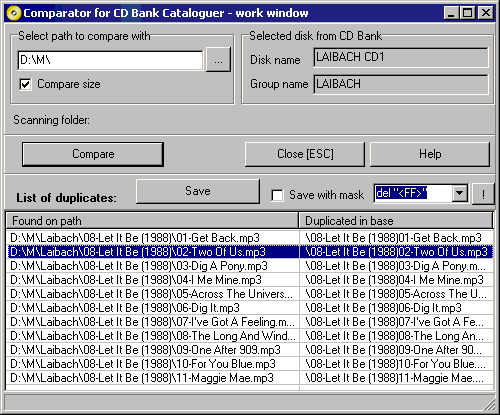 On the screenshot you can see main interface elements - "Path to compare", "Disk from CD Bank base", results - list of duplicated files, and "Save" button for saving the results to file. How to use the Comparator
|
|
accueil | produits | télécharger | acheter | support | info | a propos |