|
Télécharger
How to print the cd cover
|
About DiskToHTML for CD Bank Cataloguer
DiskToHTML converter is simple and handy CD Cover print software, created for integration with CD Bank Cataloguer. It can receive the information about set of disks from CD Bank Cataloguer and produce the HTML file with disks parameters, disk statistics and full file list.
DiskToHTML is included to CD Bank main distributive. You can always find it in "Disk Utilities" main menu.
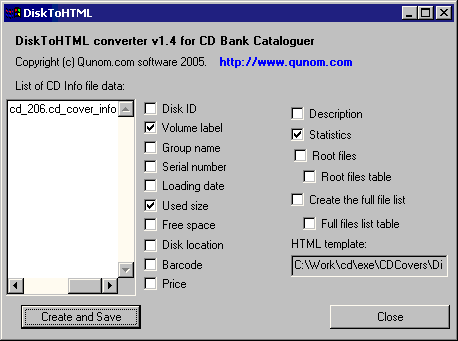
DiskToHTML interface
Here you can specify which disk parameters you want to export to HTML.
How to use the DiskToHTML
- Start the CD Bank Cataloguer
- Select the disk(s) what you want to print
- Open menu "Disk Utilities > DiskToHTML.exe"
- DiskToHTML will run.
- Check ON the boxes for parameters you want to save to HTML.
- Press "Create and Save" button
- "Save file" dialog will show. Select, where you want to save the resulting files.
- Html file with selected CD properties will create and show in Explorer.
- You can print it, send as a file, edit with any HTML-editor etc.
HTML template
Each HTML page generated by template - "DiskToHTML_list_template.htm" file from CDCovers folder. Template contains the %PLACE_TABLE_HERE% string, which marks the place for table. All other text can be changing. You can edit the template with any HTML-Editor.
Use the template for assigns the character settings (charset), page header, footer, style etc. HTML tag <style> allows to changing the HTML file design with full power of CSS formatting.
For example, following tag set all fonts to Verdana.
<style type="text/css">
	BODY { font-family: Verdana; }
</style>
Styles .files_table and .stat_table a defined for formatting the file table and disk statistics table correspondingly.
For example:
Printed by DiskToHTML converter v1.5 for CD Bank Cataloguer
| Disk name |
Loading date |
Description |
Statistics |
Cover image |
| Qunom |
06.02.2005 |
Disk Qunom
loaded to Archives\Qunom group
at 06.02.2005
----------
My collection
CD Bank Cataloguer v2.6.5
mode: -
|
| File type | Count | Count% | Size | Size% |
|---|
| Music files | 0 | 0,00% | 0 | 0,00% | | Pictures | 461 | 7,26% | 39526754 | 9,28% | | Video files | 0 | 0,00% | 0 | 0,00% | | Archives | 644 | 10,15% | 201465185 | 47,29% | | Documents | 876 | 13,80% | 12825779 | 3,01% | | Texts | 290 | 4,57% | 846098 | 0,20% | | Source codes | 773 | 12,18% | 6884191 | 1,62% | | Executables | 183 | 2,88% | 58340108 | 13,69% |
|
 |
Disk statistics
Disk statistics is an amount and volume of files on disk divided by several files types.
| File type |
Count |
Count% |
Size |
Size% |
| Music files | 3 | 0,05% | 22209511 | 3,90% | | Pictures | 293 | 5,24% | 47186989 | 8,28% | | Video files | 12 | 0,21% | 145017344 | 25,44% | | Archives | 428 | 7,66% | 111314020 | 19,53% | | Documents | 728 | 13,03% | 10016875 | 1,76% | | Texts | 211 | 3,78% | 728361 | 0,13% | | Source codes | 572 | 10,23% | 5659544 | 0,99% | | Executables | 123 | 2,20% | 45664851 | 8,01% |
Statistics allow you to get the quick overview of the disk content.
Disk contents to HTML
DiskToHTML can export to HTML both CD parameters (title, size, cover image) and disk contents (list of files and folders). This allows you to make the full disk replica in HTML-format for printing, sharing or uploading to Internet.
For example:
|
Disk "Grand Funk Railroad - Survival"
Back to disk list
\
| File name | File size | File date | Alt. name |
|---|
| Track01.cda | 44 | 01.01.1995 03:00 | 01 Country Road |
| Track02.cda | 44 | 01.01.1995 03:04 | 02 All You've Got Is Money |
| Track03.cda | 44 | 01.01.1995 03:09 | 03 Comfort Me |
| Track04.cda | 44 | 01.01.1995 03:16 | 04 Feelin' Alright |
| Track05.cda | 44 | 01.01.1995 03:20 | 05 I Want Freedom |
| Track06.cda | 44 | 01.01.1995 03:27 | 06 I Can Feel Him In The Morning |
| Track07.cda | 44 | 01.01.1995 03:34 | 07 Gimme Shelter |
Back to top...
|
Version history
| Date |
Version |
What's new |
| 20 March 2005 |
Version 1.5 |
Printing the cover images. |
| 28 February 2005 |
Version 1.4 |
Micro renamed to DiskToHTML.
Check box - "Create full files list as table". Check boxes states now saves for the next session. |
| 24 February 2005 |
Version 1.3 |
HTML template. |
| 13 February 2005 |
Version 1.2 |
Column selection. Save the full file list. |
| 16 November 2004 |
Version 1.1 |
Print the Root files. |
|