
| accueil | produits | télécharger | acheter | support | info | FORUM | a propos |

|
|
||||||||||
|
 |
|
Freeware pages CD Bank pages New file wizard
|
1 Click Wallpaper description1 Click Wallpaper is small program for quick and easy changing the Windows desktop wallpapers. What is most important for this SysTray, always-running program? Minimum size, maximum compact, we think. 1 Click Wallpaper have only 55 kb exe size! 1 Click Wallpaper can switch wallpapers forward, backward, random by list, manual, once at Windows running and by timer. Program can start every time when Windows start or every time when it need for you, change wallpaper and silently close (or minimize to SysTray). Distributed as Freeware. 1 Click Wallpaper interface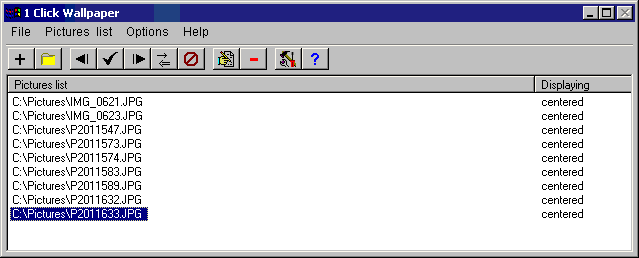 DownloadDownload the 1 Click Wallpaper v1.2 - swpsetup.exe (94 kb). How to install?Execute swpsetup.exe. Program will install to selected location. For uninstall - select "Programs|Qunom|1 Click Wallpaper|Uninstall". Version history
1 Click Wallpaper PAD-filePAD-file for 1 Click Wallpaper: http://www.qunom.com/pad/swp_pad.xml. Use it free for getting last-updated information. Full list of all PAD-files see at Support page.
|