| accueil | produits | télécharger | acheter | support | info | FORUM | a propos |

|
|
|||||||||||
|
||||||||||||
 |
Report #10 (19/12/2005). CRC32 calculation, search file from catalog on diskIn CD Bank Cataloguer v2.7.3 we announcing the new features:
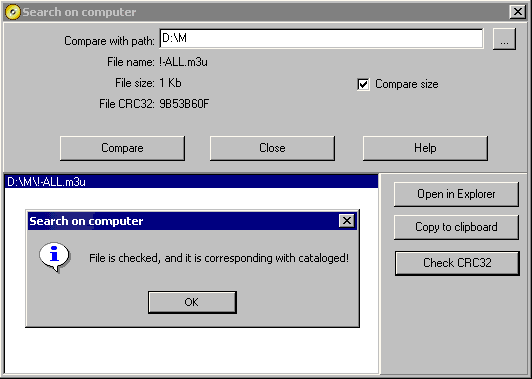
CRCCRC mean Cyclic redundancy check. It is a calculation made from all the data in a file to insure accuracy in transmission. Now, you can switch on and off the "Calculate CRC32 for files" check box in "Options" page on "Add disk" dialog. With this option, CD Bank will calculate the CRC for all files on scanned media, and store it in the base. Then CRC exist, program can show it in special custom column (see menu "Views \ Custom columns"), and use for file searching and checking. Please note: CRC calculation can take a long time, depend on file size, and computer throughput. In some cases, it can be about few minutes per gigabyte of media. Search file from catalog on diskThis command allows you to search the files on your computer, which is a same as selected in catalog. Use it for comparing the cataloged media with hard drive, files prepared for burning etc. Command is accessible if you select some file or folder in file list. Call this command, select the path (any drive or folder on your system) what you want to search file for, and press Compare button. CD Bank will find all files, which have the same name and size with pattern. When some same file or folder found, you can do the followings:
This command is similar to Comparator tool functionality. Comparator is a Disk utility, accessible on our web site, and allows you to compare the completely cataloged disk with any drive or media. You can download it and install free (for CD Bank Cataloguer Professional license users). "Search file from catalog on disk" are accessible in LITE license too. Download last CD Bank Cataloguer version. |
|
accueil | produits | télécharger | acheter | support | info | a propos |